How to Use AI for Study: Practical Checks and Assessment Rules
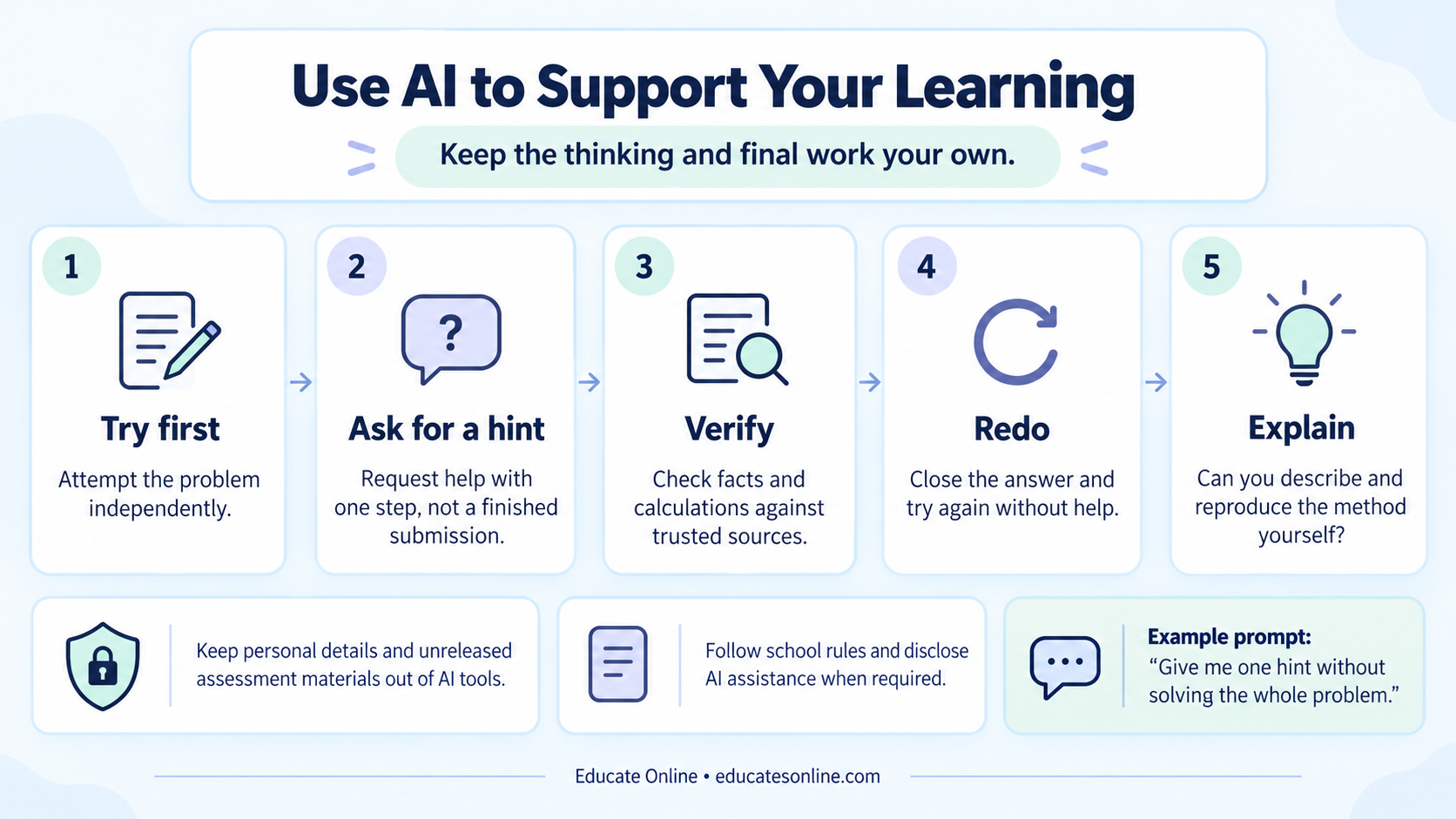
AI can support study when it helps a student understand, practise and check an idea while the student still does the thinking. Attempt the task first, ask for a small hint, verify the response and then repeat the method independently. For homework or assessment, permission depends on the particular task, school and awarding body.
This guide is for school students and parents, including GCSE, IGCSE, A Level, IB and AP learners. The practical examples are original study exercises. The JCQ rules discussed below apply in their stated qualification context; they are not a single worldwide policy for every programme.
Before using an AI study tool
- Confirm that the tool and intended use are allowed for this task and age group.
- Keep personal details and confidential schoolwork out of prompts.
- Treat generated answers, sources and marks as things to check.
- Finish with work you can explain without the tool.
Choose a learning task with a clear purpose
“Help me learn simultaneous equations” is more useful when paired with a specific difficulty: “I can rearrange each equation but I do not know which variable to eliminate.” A small, clear request lets you judge whether the answer addresses the gap.
| Possible study use | Useful instruction | What to check |
|---|---|---|
| Explain a concept | Use one simpler example, then ask me a question | The explanation agrees with course material and preserves important conditions |
| Practise a skill | Give one original practice question at a time, with the solution hidden | The question is solvable and the answer is correct |
| Review reasoning | Point to the first step that needs checking without rewriting the whole answer | The feedback refers to the actual work and a valid method |
| Plan study | Organise these topic names into my available study windows | The plan includes realistic tasks, breaks and the correct deadlines |
These prompts do not establish permission to use AI on assessed work. Use ordinary practice material where appropriate, and ask the teacher before entering a live assessment task. For younger learners, an adult should help choose an age-appropriate tool and understand its account and privacy settings.
Use a five-step routine
- Attempt: write what you know and mark the first place you get stuck.
- Ask: request one hint or a question that directs your attention.
- Verify: compare the explanation with a textbook, official resource or a teacher’s method.
- Redo: close the conversation and complete a fresh attempt.
- Reflect: explain what changed in your understanding and what remains uncertain.
An example prompt for unassessed practice is: “I am practising equations. I expanded 2(x + 3) = 14 to 2x + 3 = 14. Ask me one question to help me check my expansion; do not give the final answer yet.” The learner still needs to notice that multiplying the bracket means multiplying both terms.
A worked check: a convincing answer can still be wrong
Suppose a response says that a 20% increase followed by a 20% decrease returns a price to its starting value. Test the statement with an original example: start at £100, increase to £120, then calculate 20% of £120, which is £24. The final price is £96, not £100.
The second percentage uses a different base. Algebraically, the combined multiplier is 1.2 × 0.8 = 0.96. A useful follow-up is to explain this in your own words and test a fresh starting value. At £50, the same sequence gives £60 and then £48.
This is a deliberately invented error-checking scenario, not a report of a particular tool’s output. It demonstrates a practical habit: use a simple test case, recompute the steps and inspect assumptions before accepting a fluent explanation.
Verify sources and feedback separately
If a response names a source, open the actual page and confirm the claim appears there. Check the publisher, date and relevant qualification or exam year. A real page can still be the wrong source for the claim; a plausible title does not establish that a document exists.
For essay feedback, ask which sentence lacks evidence and why. For Maths, check substitutions, units and restrictions. For science, confirm terminology and conditions against course material. A generated practice score is not an official examiner’s mark or a reliable predicted grade. Compare important judgements with the correct mark scheme and a teacher’s feedback.
Know the assessment rules before you use AI
JCQ’s AI assessment guidance explains that copying or paraphrasing generated material can be misuse when the submitted work is no longer the student’s own. Acknowledging AI does not automatically make every use acceptable or earn credit for skills the student has not demonstrated independently.
For relevant GCE and GCSE non-examination assessments, the JCQ instructions effective from September 2026 require appropriate referencing and records where AI has been used. These include the tool, generation date, prompts, generated material and an explanation of its use. Ask the teacher for the precise permitted assistance and submission requirements before starting; subject-specific conditions still apply.
For IB, AP, Cambridge International or another programme, use the rules for that qualification and your school. A policy permitting help with private revision does not necessarily permit the same help during coursework, an exam or an assessed project.
Protect privacy and keep human support available
UNICEF’s guidance on AI and children places children’s privacy, safety and well-being among its core requirements. As a practical household routine, remove names, student numbers, school reports and private conversations from anything you consider sharing. Do not upload confidential or unreleased assessment material.
Review the tool’s age rules and data settings with a parent or teacher where appropriate. If an explanation remains confusing, save your own working and ask a person who knows the course. The student should be able to question an answer, express uncertainty and receive feedback without depending on a chatbot’s confidence.
Check whether the tool actually helped
After the session, try a new question without assistance. Explain the method aloud and compare with your first attempt. If you can only repeat the generated explanation while looking at it, return to guided teaching and smaller practice steps. Our revision guide shows how to structure independent checks; subject tutoring can provide human feedback on the step that still does not make sense.
Frequently asked questions
Can I use AI for schoolwork or coursework?
Check the exact task, school and awarding-body rules before using it. Permission for private revision does not automatically extend to coursework or an exam. Acknowledging AI also does not make an otherwise prohibited use acceptable.
What records may be needed when AI use is permitted in a JCQ assessment?
Relevant JCQ guidance requires appropriate acknowledgement and records, including the tool, generation date, prompts, output and an explanation of use. Confirm the precise subject and submission requirements with your teacher.
How can I tell whether an AI explanation helped?
Close the conversation, solve a fresh question and explain the reasoning without assistance. If you can only repeat the answer while looking at it, return to the missing concept and ask for human help.
Can an AI tool reliably predict my exam grade?
Treat generated marks as feedback to check, not an official grade prediction. Compare your work with the correct specification and mark scheme, and ask a teacher about important or uncertain judgements.
Sources
External references for the topics covered in this guide.
- AI Use in Assessments: protecting the integrity of qualifications (opens in a new tab)Joint Council for Qualifications · jcq.org.uk
- Instructions for conducting non-examination assessments: effective September 2026 (opens in a new tab)Joint Council for Qualifications · jcq.org.uk
- Guidance on AI and children (opens in a new tab)UNICEF Innocenti · unicef.org